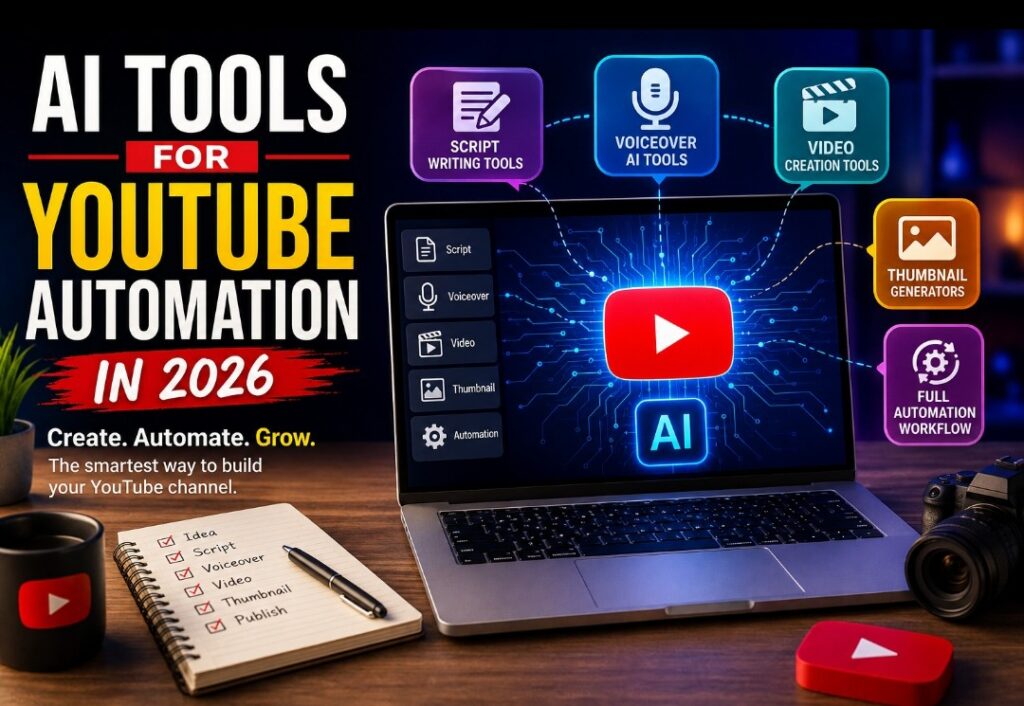
AI tools for YouTube automation have completely transformed the way creators produce videos in 2026. Tasks that once required hours—or even days—such as researching topics, writing scripts, recording voiceovers, editing videos, designing thumbnails, and optimizing content for search can now be completed much faster with the help of artificial intelligence. Whether you’re a beginner launching your first channel or an experienced creator managing multiple YouTube projects, AI can help streamline your workflow while allowing you to focus on creating valuable content.
The rise of AI has also lowered the barrier to entry for content creation. You no longer need expensive equipment, advanced editing skills, or a large production team to publish professional-looking videos. With the right combination of AI tools, a single creator can produce high-quality content that rivals much larger channels. From realistic AI voice generators to intelligent video editors and thumbnail creators, modern AI platforms make YouTube automation more accessible than ever before.
That said, successful YouTube automation is not about letting artificial intelligence do everything for you. The channels that achieve long-term growth are those that combine AI efficiency with originality, creativity, accurate information, and a deep understanding of their audience. AI should be viewed as a powerful assistant that removes repetitive work—not as a replacement for your unique ideas or storytelling ability.
In this comprehensive guide, we’ll explore the best AI tools for YouTube automation, explain how each one fits into the content creation process, compare their strengths, and share practical tips to help you build a faster, smarter, and more efficient YouTube workflow. Whether your goal is growing a faceless channel, creating educational content, publishing product reviews, or building a profitable content business, these AI tools can help you save time while improving the quality and consistency of your videos.
If you’re also interested in discovering AI platforms beyond YouTube, don’t miss our comprehensive guide to Best AI Tools for Students and Businesses, where we compare some of the most powerful AI tools available today for learning, productivity, content creation, and business growth.
What Are AI Tools for YouTube Automation?
AI tools for YouTube automation are software applications that help creators automate repetitive parts of video production, including script writing, AI voiceovers, video editing, thumbnail creation, subtitles, and YouTube SEO. Instead of replacing creativity, these tools save time so creators can focus on producing valuable content and growing their channels.
AI tools for YouTube automation have changed content creation dramatically over the last few years. Building a successful YouTube channel once required expensive cameras, professional editing software, recording studios, and countless hours of manual work. Today, artificial intelligence allows creators to complete many of these tasks in a fraction of the time.
Whether you’re launching your first YouTube channel or already managing multiple channels, AI can help streamline your workflow. From researching video ideas to writing scripts, generating realistic voiceovers, editing videos, creating eye-catching thumbnails, and optimizing titles for search, AI now supports almost every stage of content creation.
However, successful YouTube automation isn’t about allowing artificial intelligence to do everything. The creators who achieve long-term success still rely on their own creativity, experience, and understanding of their audience. AI simply removes repetitive tasks so more time can be spent producing videos people genuinely enjoy watching.
💬 My Perspective
If there’s one lesson I’ve learned from watching successful YouTube creators, it’s that consistency usually matters more than expensive equipment. AI tools for YouTube automation make it easier to stay consistent by reducing the time spent on repetitive work. They won’t replace creativity or storytelling, but they can remove many of the technical barriers that prevent beginners from publishing regularly. Used wisely, AI becomes a productivity partner rather than a shortcut.
🚀 Recommended AI Guide
If you’re still exploring which AI platforms are worth learning, our complete comparison guide covers the most useful AI tools for students, professionals, businesses, and content creators.
Why AI Tools for YouTube Automation Are Becoming Essential in 2026
The competition on YouTube continues to increase every year. Thousands of new channels launch daily, making it harder to stand out simply by uploading videos. Creators now need to produce high-quality content consistently while also optimizing titles, thumbnails, descriptions, and viewer engagement.
This is where AI tools for YouTube automation become valuable. Instead of spending several days producing one video, creators can automate research, drafting, editing, subtitle generation, and thumbnail design while maintaining creative control over the final product.
Many creators use AI to reduce production time from several hours to less than half while maintaining professional quality. The result is more time for audience engagement, content strategy, and long-term channel growth.
- Faster video production.
- Better consistency.
- Improved productivity.
- Lower production costs.
- Professional-quality content for beginners.
- More time to focus on creativity.
Best AI Tools for YouTube Automation: Script Writing Software
Every successful YouTube video begins with a strong script. Without a clear structure, viewers often lose interest before reaching the end of the video. AI writing assistants help creators organize ideas, improve flow, and overcome writer’s block without replacing their personal style.
1. ChatGPT
ChatGPT remains one of the most popular AI tools for YouTube automation because it assists with brainstorming, outlining, rewriting introductions, generating talking points, and improving readability. Rather than asking it to write an entire script, many experienced creators prefer generating each section separately before adding their own insights and editing.
2. Google Gemini
Google Gemini is particularly useful for research-based content. It integrates well with Google’s ecosystem and helps summarize complex topics into clear explanations suitable for YouTube audiences.
If you’re new to Gemini, read our complete guide here:
Google Gemini Complete Guide →
3. Claude
Claude is well suited for long-form educational videos because it maintains context effectively during extended conversations. Many creators use it for documentaries, tutorials, explainers, and storytelling channels.
No matter which AI assistant you choose, always verify statistics, dates, technical facts, and quotations before publishing your videos.
Best AI Voiceover Tools for YouTube Automation
One of the biggest advantages of using AI tools for YouTube automation is the ability to generate professional-quality voiceovers without investing in expensive recording equipment. Modern AI voice generators sound remarkably natural and support multiple languages and accents, making them suitable for creators targeting audiences around the world.
4. ElevenLabs
ElevenLabs is widely regarded as one of the most realistic AI voice generators available today. It produces human-like narration that works well for documentaries, educational videos, storytelling channels, finance content, and faceless YouTube channels. The platform also allows users to fine-tune pronunciation and pacing for a more natural listening experience.
5. Murf AI
Murf AI offers a large library of professional voices suitable for tutorials, product reviews, explainer videos, and business presentations. It also includes voice editing features that let creators adjust emphasis, pauses, and speaking speed without re-recording audio.
6. PlayHT
PlayHT supports dozens of languages and voice styles, making it an excellent option for creators who publish multilingual content. Its realistic speech engine can help channels expand to international audiences more efficiently.
Although AI voiceovers continue to improve, it’s still worth reviewing the final narration carefully. Small adjustments to pronunciation and emphasis can make a noticeable difference in the overall quality of your videos.
Best AI Video Creation Tools for YouTube Automation
Video editing often takes longer than script writing or recording. Fortunately, AI tools for YouTube automation now simplify editing by automatically combining scripts, voiceovers, stock footage, subtitles, transitions, and background music into polished videos.
7. Pictory
Pictory transforms written articles and scripts into engaging videos using artificial intelligence. It automatically matches your content with relevant stock footage, adds captions, and produces professional-looking videos in a fraction of the usual editing time.
8. InVideo AI
InVideo AI generates complete videos from simple prompts. It creates scenes, subtitles, transitions, visuals, and even voiceovers automatically, making it one of the most beginner-friendly AI video editors available today.
9. Synthesia
Synthesia specializes in AI avatar videos. Businesses, educators, and online course creators frequently use it to produce training materials and presentations without appearing on camera.
📘 Related Guide
If you’re planning to earn money from content creation, you’ll also benefit from learning about other AI platforms that improve writing, productivity, and business growth.
Best AI Thumbnail Generators for YouTube Automation
Your thumbnail is often the first thing viewers notice before deciding whether to click on a video. Even outstanding content may struggle if the thumbnail fails to attract attention. Fortunately, several AI tools for YouTube automation make thumbnail creation much easier.
10. Canva AI
Canva AI combines drag-and-drop simplicity with intelligent design suggestions. It allows creators to generate attractive YouTube thumbnails, remove backgrounds, resize images, improve colors, and create professional graphics without advanced design skills.
Adobe Express AI
Adobe Express includes AI-powered image editing, automatic background removal, and professional templates that help creators produce clean, eye-catching thumbnails quickly.
Microsoft Designer
Microsoft Designer uses artificial intelligence to generate creative thumbnail ideas from short text prompts. It is particularly useful when you’re looking for fresh visual inspiration.
While AI can generate attractive designs, always ensure your thumbnail accurately reflects your content. Misleading thumbnails may increase clicks temporarily but often reduce viewer trust over time.
Complete AI Tools for YouTube Automation Workflow
Successful creators rarely use AI randomly. Instead, they follow a structured workflow that saves time while maintaining consistent quality. Here’s a practical workflow that many YouTubers follow:
- Research topics using ChatGPT or Google Gemini.
- Create a structured script and refine it with your own knowledge.
- Generate realistic narration using ElevenLabs or Murf AI.
- Create and edit the video using Pictory or InVideo AI.
- Design an attractive thumbnail with Canva AI.
- Optimize YouTube SEO by writing compelling titles, descriptions, and tags.
- Publish consistently and monitor analytics to improve future videos.
💡 Pro Tip
Using AI tools for YouTube automation should never replace originality. The most successful channels combine AI efficiency with personal storytelling, accurate information, and genuine audience engagement.
Also read our beginner-friendly guide: How to Use AI Tools to Start Blogging with Zero Experience →
For official guidance on creating and managing a YouTube channel, visit the YouTube Help Center .
Common Mistakes to Avoid When Using AI Tools for YouTube Automation
Many beginners believe that using AI tools for YouTube automation means letting artificial intelligence handle everything. While AI can dramatically reduce the time spent on repetitive tasks, relying on it completely often leads to generic content that struggles to build a loyal audience.
Here are some of the most common mistakes new creators make:
- Publishing AI-generated scripts without editing them.
- Using robotic voiceovers without checking pronunciation.
- Creating misleading thumbnails simply to increase clicks.
- Ignoring comments and audience feedback.
- Failing to fact-check AI-generated information.
- Uploading videos without a consistent publishing schedule.
- Choosing quantity over quality.
- Depending on one AI tool instead of building useful skills.
The best YouTube creators review every script, improve every thumbnail, verify facts, and add their own personality before publishing. AI should make your workflow easier—not replace your creativity.
The Future of AI Tools for YouTube Automation
The future of AI tools for YouTube automation looks even more exciting. AI platforms are becoming better at understanding language, generating realistic visuals, editing videos, translating content, and personalizing recommendations for different audiences.
In the coming years, creators may spend less time on repetitive production work and more time building communities, researching ideas, and developing better storytelling techniques.
However, one thing is unlikely to change. Original thinking, trust, and authenticity will continue to separate successful creators from channels that simply rely on automation.
Creators who combine AI efficiency with human creativity are likely to achieve the strongest long-term growth.
💬 My Perspective
After spending time learning about different AI platforms and observing how creators use them, I believe AI should be viewed as a smart assistant rather than a shortcut to success. It can help with writing, editing, voiceovers, and video production, but it cannot replace original ideas, personal experiences, or the unique way each creator connects with an audience.
In my opinion, creators who continue learning new skills while using AI responsibly will have a stronger advantage than those who depend entirely on automation. Technology will continue to evolve, but people will always value content that feels authentic, useful, and trustworthy.
Are AI Tools for YouTube Automation Worth Using?
For most creators, the answer is yes. AI tools for YouTube automation reduce production time, improve productivity, and make professional-quality content more accessible to beginners and experienced creators alike.
Instead of spending several days creating one video, many YouTubers now complete research, scripting, editing, and thumbnail creation within a much shorter period by using AI-powered software.
The biggest advantage isn’t simply working faster—it’s having more time to improve your ideas, interact with your audience, and create better content consistently.
Final Thoughts on AI Tools for YouTube Automation
AI tools for YouTube automation have changed the way creators produce videos in 2026. From script writing and realistic voiceovers to automated editing and thumbnail creation, these tools can significantly reduce workload while improving efficiency.
However, successful YouTube channels are still built on creativity, consistency, and audience trust. AI can assist with production, but your ideas, storytelling, and personal experience remain the most valuable parts of your content.
If you’re just beginning your YouTube journey, start with one or two AI tools, master your workflow, and expand gradually as your channel grows.
🚀 Continue Your AI Learning Journey
Discover more beginner-friendly AI software that can help you create content, build online businesses, and improve productivity.
Frequently Asked Questions About AI Tools for YouTube Automation
What are AI tools for YouTube automation?
AI tools for YouTube automation are software applications that assist with script writing, voice generation, video editing, thumbnail creation, subtitles, and workflow automation.
Can AI create an entire YouTube video?
AI can automate many parts of video production, but human editing, creativity, and fact-checking are still important for producing high-quality content.
Is YouTube automation allowed?
Yes. Using AI tools is allowed provided your videos comply with YouTube’s policies and offer genuine value to viewers.
Which AI tool is best for YouTube script writing?
Many creators use ChatGPT, Google Gemini, and Claude because they help generate ideas, organize information, and draft engaging scripts quickly.
Can beginners use AI tools for YouTube automation?
Absolutely. Most modern AI platforms are designed with beginners in mind and require little or no technical experience.
Do AI tools guarantee YouTube success?
No. AI can improve efficiency, but consistent publishing, valuable content, audience engagement, and originality remain the biggest factors behind long-term channel growth.

Osayamen Okuonghae
AI Researcher | Founder of AICompareGuide.com
Helping professionals and businesses make smarter decisions through
in-depth AI tool comparisons, feature breakdowns, and practical insights
on leading AI assistants like ChatGPT, Gemini, and Claude.