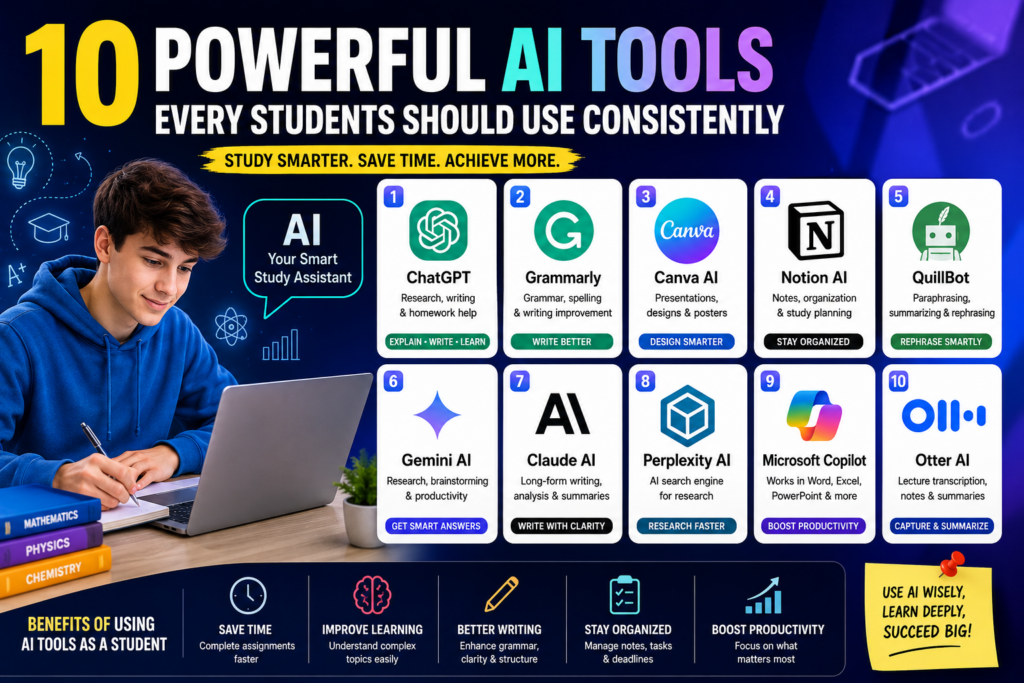
10 Powerful AI Tools Every Student Should Use Consistently in 2026 are changing the way students learn, research, complete assignments, and prepare for examinations. Artificial intelligence has become one of the most valuable learning companions available today, helping students save time, improve productivity, and achieve better academic results without needing advanced technical skills.
Whether you are a secondary school student, university undergraduate, postgraduate, or an online learner, using the right AI tools can make studying more effective and far less stressful. Modern AI platforms can explain difficult concepts, summarize lengthy textbooks, improve grammar, organize notes, generate presentations, and even help students develop stronger study habits.
One of the biggest advantages of using AI consistently is that it allows students to focus more on understanding concepts rather than spending countless hours performing repetitive academic tasks. Instead of struggling with writer’s block, confusing research materials, or poorly organized notes, students can use AI to simplify their workflow while improving the quality of their assignments.
In this comprehensive guide, you’ll discover the 10 Powerful AI Tools Every Student Should Use Consistently in 2026, what makes each platform unique, and how each one can help improve learning, productivity, creativity, and overall academic performance. Most of these tools also offer generous free plans, making them accessible to students around the world.
If you’re new to artificial intelligence, we also recommend reading our complete guide on Best AI Tools for Students and Businesses, where we compare the leading AI platforms for education, content creation, and productivity.
🚀 Study Smarter with AI in 2026
Discover powerful AI tools that help students write better assignments, understand difficult subjects, create presentations, organize study materials, and improve productivity every day.
My Perspective
After reviewing dozens of AI platforms and observing how students use them, I believe artificial intelligence is becoming one of the most important educational technologies of this generation. The students gaining the biggest advantage are not necessarily the smartest—they are often the ones who know how to use AI responsibly to improve their learning process.
I have seen students use ChatGPT to understand complex science topics, Grammarly to polish essays, Canva AI to create professional presentations, Notion AI to organize semester projects, and QuillBot to rewrite difficult paragraphs into simpler language. These tools don’t replace learning; they remove unnecessary obstacles so students can focus on understanding concepts instead of wasting hours on repetitive tasks.
However, AI should always be treated as a learning assistant rather than a replacement for critical thinking. The best students use AI to ask better questions, verify information, improve their work, and strengthen their understanding—not to avoid learning. When used ethically and consistently, these AI tools can help students become more productive, more organized, and better prepared for success both in school and in their future careers.
Why Students Should Use AI Tools Consistently
The 10 Powerful AI Tools Every Student Should Use Consistently are more than just digital assistants. They are productivity tools that help students learn faster, complete academic tasks more efficiently, and develop stronger study habits. As educational demands continue to increase, students need smarter ways to manage their workload without sacrificing the quality of their learning.
Instead of spending hours searching for information across multiple websites, students can use AI tools to summarize research materials, explain difficult concepts, generate study notes, improve writing, and organize assignments. This saves valuable time that can be used for revision, practice, and gaining a deeper understanding of each subject.
AI also encourages independent learning. Rather than waiting for a teacher or tutor to become available, students can ask AI assistants questions anytime and receive detailed explanations instantly. This flexibility makes learning more accessible, especially for students studying remotely or preparing for examinations.
- Improve research efficiency
- Create better assignments and essays
- Understand difficult concepts more quickly
- Organize notes and study schedules
- Design professional presentations
- Improve grammar and writing quality
- Reduce academic stress and save time
- Increase productivity throughout the semester
Although AI is incredibly helpful, students should always review AI-generated information carefully and use it as a learning companion rather than relying on it completely.
Comparison Table of the Best AI Tools for Students
| AI Tool | Best For | Free Plan | Difficulty |
|---|---|---|---|
| ChatGPT | Homework, research, writing | Yes | Very Easy |
| Grammarly | Grammar and proofreading | Yes | Very Easy |
| Canva AI | Presentations and graphic design | Yes | Easy |
| Notion AI | Notes and organization | Yes | Easy |
| QuillBot | Paraphrasing and summaries | Yes | Very Easy |
| Gemini AI | Research and brainstorming | Yes | Easy |
| Claude AI | Long-form writing | Yes | Easy |
| Perplexity AI | AI-powered research | Yes | Easy |
| Microsoft Copilot | Microsoft 365 productivity | Yes | Easy |
| Otter AI | Lecture transcription | Yes | Very Easy |
💡 Recommended Reading
Want to discover even more AI platforms for learning and productivity? Explore our detailed guide on Best AI Tools for Students and Businesses to compare additional AI tools for studying, writing, design, research, and business.
1. ChatGPT
ChatGPT remains one of the most powerful AI tools available to students in 2026. Developed to understand natural language and generate human-like responses, it helps students complete academic tasks faster while improving their understanding of difficult subjects.
Students use ChatGPT for brainstorming ideas, explaining complex concepts, solving homework problems, summarizing lengthy articles, generating essay outlines, writing study notes, practicing interview questions, and even learning programming languages. Its versatility makes it one of the first AI tools many students use daily.
Another advantage is its conversational style. Students can ask follow-up questions until they fully understand a topic, making ChatGPT feel more like a personal tutor than a search engine. Whether you’re preparing for exams or writing a research paper, ChatGPT can significantly improve both productivity and learning when used responsibly.
2. Grammarly
Grammarly is one of the most trusted AI writing assistants for students who want to improve the quality of their assignments, essays, emails, and research papers. Instead of simply correcting spelling mistakes, Grammarly analyzes sentence structure, punctuation, clarity, tone, and readability to make writing more professional.
Many students use Grammarly after completing their first draft to identify grammar errors and improve sentence flow before submitting assignments. This helps produce clearer, more polished academic work while reducing common writing mistakes.
Whether you’re writing a short report or a lengthy dissertation, Grammarly can help you communicate your ideas more effectively.
3. Canva AI
Canva AI has become one of the best AI tools for students who regularly create presentations, posters, infographics, reports, and visual projects. Its AI-powered features allow students to generate professional-looking designs without needing graphic design experience.
Students can use Canva AI to create classroom presentations, project covers, study flashcards, diagrams, resumes, and social media graphics within minutes. The platform includes thousands of templates that make designing simple and enjoyable.
Its Magic Design, Magic Write, and AI image generation tools further improve creativity, making Canva an excellent companion for academic and creative work.
💡 Explore More AI Resources
If you’re looking beyond student tools, explore our complete guide on Best AI Tools for Students and Businesses to discover more powerful AI platforms for education, freelancing, content creation, and productivity.

4. Notion AI
Notion AI helps students stay organized by bringing notes, assignments, research materials, study schedules, and project planning into one workspace. Instead of switching between multiple apps, students can manage almost every aspect of their academic life in a single platform.
Its AI features summarize lecture notes, generate meeting summaries, organize study plans, create task lists, and help students brainstorm ideas for assignments and projects. This makes Notion AI especially valuable for students handling multiple courses at once.
Students who develop strong organizational habits with Notion AI often find it easier to manage deadlines and reduce academic stress.
5. QuillBot
QuillBot is one of the most popular AI tools for paraphrasing and rewriting academic content. Students frequently use it to improve sentence structure, simplify complex writing, and remove repetitive wording while maintaining the original meaning.
Besides paraphrasing, QuillBot also offers grammar checking, summarization, citation generation, and writing enhancement tools that make academic writing easier and more efficient.
It is especially useful when editing essays, reports, research papers, and study notes before final submission.
6. Gemini AI
Gemini AI, developed by Google, is becoming an increasingly valuable learning assistant for students. It helps users research topics, brainstorm ideas, summarize information, and answer academic questions using Google’s AI technology.
Students often rely on Gemini AI when preparing assignments, exploring new subjects, or finding different explanations for complex concepts. Its integration with Google’s ecosystem also makes it convenient for students who regularly use Google Docs, Drive, and other Google Workspace applications.
For research, idea generation, and academic productivity, Gemini AI continues to rank among the top AI tools available to students in 2026.
7. Claude AI
Claude AI is an advanced AI assistant designed to help users understand lengthy documents, generate detailed explanations, and produce well-structured written content. Students often use Claude AI when working on research papers, literature reviews, project reports, and other assignments that require in-depth analysis.
One of Claude AI’s biggest strengths is its ability to process long documents while maintaining context. This makes it useful for summarizing textbooks, reviewing lecture materials, and organizing research findings into clear, readable content.
Students looking for thoughtful explanations and high-quality long-form writing assistance will find Claude AI to be an excellent study companion.
8. Perplexity AI
Perplexity AI combines artificial intelligence with real-time web search to provide fast, informative answers backed by online sources. Instead of searching through multiple websites manually, students can receive summarized responses that help speed up research and fact-finding.
This makes Perplexity AI especially valuable when preparing assignments, exploring unfamiliar topics, or verifying information from different sources. It also encourages students to review referenced materials for deeper understanding.
9. Microsoft Copilot
Microsoft Copilot integrates AI into Microsoft Word, Excel, PowerPoint, and other Microsoft 365 applications. Students who already use these programs can take advantage of AI-powered writing suggestions, document summaries, spreadsheet assistance, and presentation creation.
Whether you’re drafting a report, analyzing data, or preparing slides for a classroom presentation, Microsoft Copilot helps automate repetitive tasks and improve overall productivity.
10. Otter AI
Otter AI is an intelligent transcription tool that records lectures, converts speech into text, and creates searchable meeting or classroom notes. Students who attend long lectures can review important discussions later without worrying about missing key information.
Otter AI is particularly useful for revision, group projects, interviews, seminars, and online classes where accurate note-taking is important.
💡 Keep Exploring AI
Looking for even more productivity tools? Browse our complete collection of Best AI Tools for Students and Businesses to discover platforms for writing, research, business, creativity, and automation.
How Students Can Use AI Responsibly
The 10 Powerful AI Tools Every Student Should Use Consistently are designed to support learning—not replace it. Students achieve the best results when they use AI to strengthen their understanding rather than simply generating answers.
- Use AI to understand concepts instead of copying answers.
- Always verify important facts with reliable sources.
- Edit and personalize AI-generated content before submitting assignments.
- Follow your school’s academic integrity and plagiarism policies.
- Use AI to improve productivity while continuing to develop your own critical thinking skills.
Responsible use of AI helps students build knowledge, confidence, and long-term academic success.
🚀 Study Smarter with AI
Discover powerful AI platforms that can help you write better assignments, improve productivity, organize study materials, and learn more efficiently throughout your academic journey.
Benefits of Using AI Tools Consistently
- Improve academic productivity
- Complete assignments more efficiently
- Strengthen writing and communication skills
- Organize notes and research materials
- Create better presentations and reports
- Save valuable study time
- Reduce academic stress
- Develop stronger digital literacy skills
Students who use AI consistently and responsibly often become more organized, confident, and efficient throughout their academic journey.
Frequently Asked Questions
What are the best AI tools for students in 2026?
Some of the best AI tools include ChatGPT, Grammarly, Canva AI, Notion AI, QuillBot, Gemini AI, Claude AI, Perplexity AI, Microsoft Copilot, and Otter AI.
Can students use AI tools for free?
Yes. Most popular AI platforms offer free plans with useful features, while premium subscriptions provide additional capabilities.
Can AI improve academic performance?
AI can improve productivity, organization, research, and writing when used responsibly alongside genuine learning and critical thinking.
Should students rely completely on AI?
No. AI should support learning rather than replace it. Students should continue developing their own understanding, creativity, and problem-solving abilities.
Final Thoughts
10 Powerful AI Tools Every Student Should Use Consistently in 2026 demonstrate how artificial intelligence is transforming modern education. From research and writing to presentations, organization, and productivity, these platforms help students work more efficiently while developing valuable digital skills.
The greatest advantage comes from combining multiple AI tools based on your specific needs. For example, you might use ChatGPT for brainstorming, Grammarly for proofreading, Canva AI for presentations, and Notion AI for organizing assignments. Together, these tools create a smarter and more productive learning workflow.
As AI continues to evolve, students who learn to use these technologies responsibly will be better prepared for success in school, higher education, and future careers.
For more expert reviews, tutorials, and AI recommendations, visit our growing collection of AI tools for students and businesses.
Osayamen Okuonghae
AI Researcher | Founder of AICompareGuide.com
Helping professionals and businesses make smarter decisions through
in-depth AI tool comparisons, feature breakdowns, and practical insights
on leading AI assistants like ChatGPT, Gemini, and Claude.